
2 x 300W Bluetooth+DSP Audio Amplifier Board - TSA3256B


20 or more $80.00

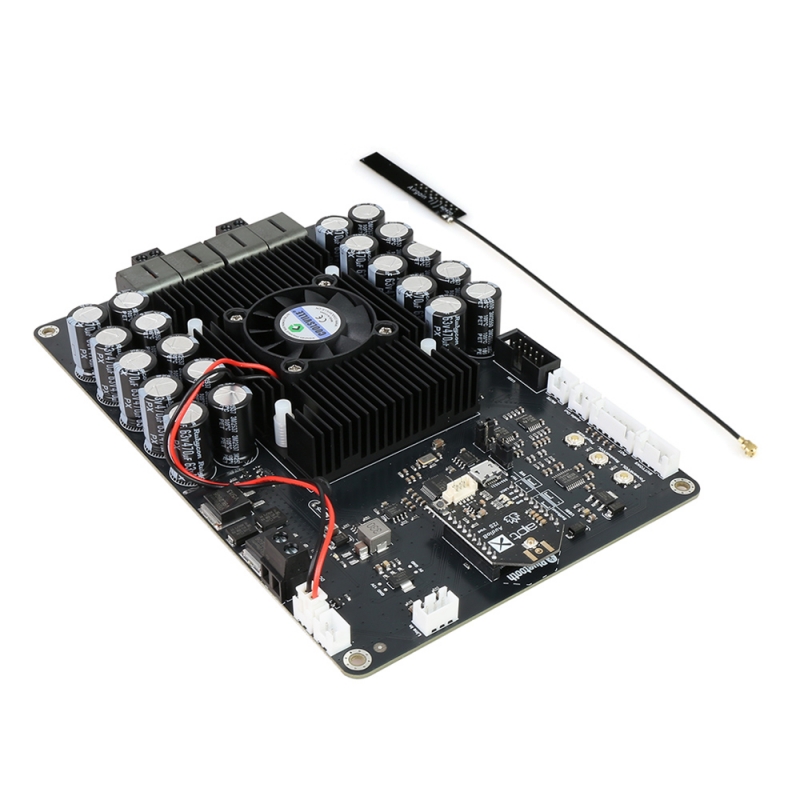
TSA3256B audio power amplifier adopts AudioB I2S V4 Bluetooth module and TI TPA3255 PurePath Ultra-HD Class-D power amplifier chip, delivering professional high-fidelity wireless audio and high-power output performance for HiFi speakers, home audio systems, and commercial audio devices. It supports aptX lossless audio decoding, featuring ultra-low latency, strong anti-interference, stable connection, and full-range sound restoration. It ensures smooth wireless audio transmission without stuttering or noise.
TSA3256B is a very flexible DSP/DAC/Amplifier combination board. Both 2 channels have 300W power output. All the channels are capable of outputting nominal power simultaneously and continuously. This board can be powered by any DC24V-53V power supply. It can be used to drive any 4Ω~8Ω passive speakers.
Two firmware versions are available: TWS firmware supports wireless linkage between two boards, while Party firmware allows multi-board sync. Built-in ADAU1701 DSP provides users with flexible audio parameter control.
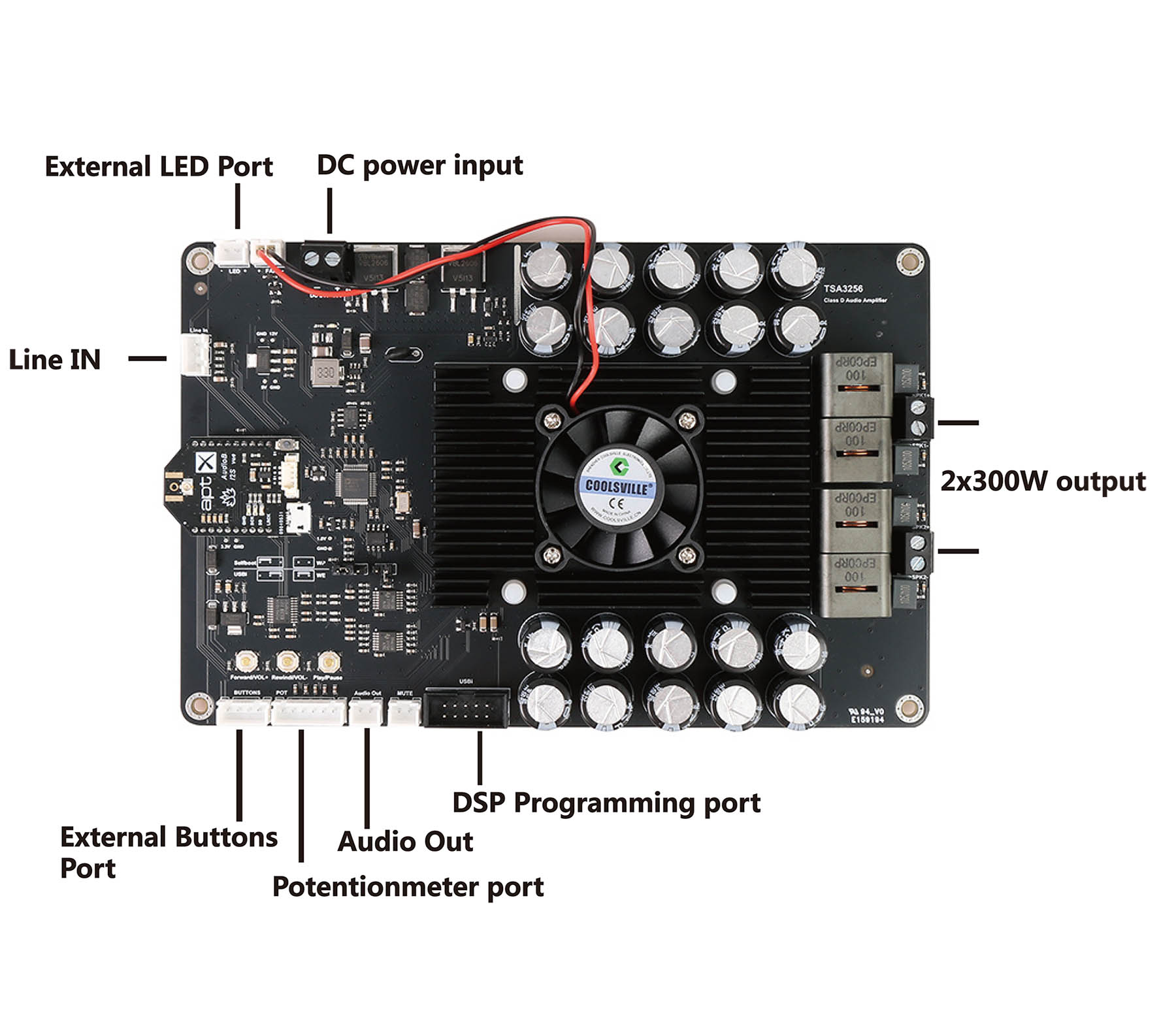
External LED port:
External Bluetooth link state LED port, Output voltage 3.3V.
External Button port:
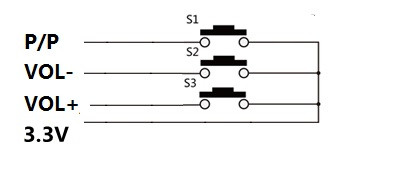
The external buttons port support connection of up to 3 external buttons for audio volume control/play/pause or TWS/Party pairing
Pins define:(Check the board backside silkscreen):
TWS firmware:
- P/P: Play pause button
- VOL+: volume increase and forward button
- VOL-: volume decrease and rewind button
- 3.3V
Party firmware:
- P/P: Pair button
- VOL+: Transmitter mode
- VOL-: Receiver mode
- 3.3V
Potentionmeters port:
You can connect external POTs (5K~20K) to control the Main volume, treble, middle, Bass. You need to update the DSP program first. DSP program(with external POTs). This is our POT kit
- ADC0- Main volume.
- ADC1- Bass volume.
- ADC2- Middle volume.
- ADC3- treble volume.
DSP programming port:
TSA3256B's DSP detects both Bluetooth signal and Line in signal, but the default program makes Bluetooth has higher prority. If Bluetooth signal detected, TSA3256B will output Bluetooth audio source, otherwise it will output Line in audio source. You can develop DSP program to fulfill your requirement, then load the new DSP program by using USBi JTAG Sigma DSP programmer.


2 boards work in TWS mode. You can also build a wireless subwoofer system.

How to use:
TWS firmware (single board)
- Power up TSA3256B, red LED slow blink then red and blue LED flash alternately.
- Now, your smartphone will be able to find a new Bluetooth device which name is "TSA3256B", connect it. Blue LED flash.
- You can play the music now.
TWS connection (2 boards can connected together)
- Master board
- Power up TSA3256B, red LED slow blink then red and blue LED flash alternately.
- Now, your smartphone will be able to find a new Bluetooth device which name is "TSA3256B", connect it. Blue LED flash.
- You can play the music now. If you only use one amplifier board, you don't need do the following steps.
- Long press S1+S3 button for 1 second, board into TWS master mode. Red and blue LED flash alternately.
- Slave board
- Power up another TSA3256B, red LED slow blink then red and blue LED flash alternately.
- Long press S1+S2 button for 1 second, board into TWS slave mode. Red and blue LED flash alternately.
- The master board will auto searching (30 seconds) slave board. Both master and slave board will be connected.
- The slave board will have music out now.
- If you want to disconnect TWS connection, long press S2+S3 button for 1 second to disconnect TWS connection.
If you have an RGB Matel Push Button with cable, one‑button pairing is also available. Please refer to this tutorial.
Party firmware (single board)
- Power up TSA3256B, blue LED flash 3 times per cycle.
- Double click S3 button, TSA3256Binto pairing mode. (Voice: Pairing, blue LED flash 2 times per cycle.)
- Now, your smartphone will be able to find a new Bluetooth device which name is "TSA3256B", connect it. (Voice: Pairing successful, blue LED flash 1 time per cycle.)
- You can play the music now.
Party connection (multi boards can connected together)
- Transmitter board
- Power up TSA3256B, blue LED flash 3 times per cycle.
- Double click S3 button, TSA3256Binto pairing mode. (Voice: Pairing, blue LED flash 2 times per cycle.)
- Now, your smartphone will be able to find a new Bluetooth device which name is "TSA3256B", connect it. (Voice: Pairing successful, blue LED flash 1 time per cycle.)
- You can play the music now. If you only use one amplifier board. You don't need do the following steps.
- Press S2 button, board into transmitter mode.(Voice: Broadcast mode)
- Receiver board
- Power up another TSA3256B, blue LED flash 3 times per cycle.
- Press S3 button, board into receiver mode.(Voice: Broadcast audio enabled)
- Double click S2 button on transmitter board, double click S3 button on receiver board, the transmitter board will auto searching (30 seconds) receiver board. Both transmitter and receiver board will be connected.
- The receiver board will have music out now.
- If a new TSA3256B want to join as receiver board, repeat step1~step3 on the new TSA3256B board.
- If a receiver board wants to quit, click S2 button on that board to set it into transmitter mode.
If you have an RGB Matel Push Button with cable, one‑button pairing is also available. Please refer to this tutorial.
Specification:
Specifications typical @ +25℃, Powered by 30V DC, unless otherwise noted. Specifications subject to change without notice.
| Parameter | Condition | Min | Typ | Max |
|
Supply Voltage (VDC) |
- | 24 | 51 | 53 |
| Power output per channel | RL= 4Ω, 10% THD+N | 315W | ||
| RL= 8Ω, 10% THD+N | 185W | |||
| RL= 4Ω, 1% THD+N | 260W | |||
| RL= 8Ω, 1% THD+N | 150W | |||
| THD+N | 1W@4Ω | 0.006% | ||
| SNR | A-weighted | 112dB | ||
| DNR | A-weighted | 113dB | ||
|
Minimum Load Impedance |
3.4Ω |
4Ω |
||
| Gain | 21.5dB | |||
| Efficiency | 100W @ 4Ohm | 90% | ||
|
Input Impedance |
20KΩ | |||
Features:
- Size: 18.5cm x 12cm x 3.4cm
- Bluetooth 5.1
- I2S Sampling Rate: 48KHz
- Wide-range 24-V to 53-V Supply Voltage Operation
- TWS firmware: aptX, aptX-HD, SBC and AAC
- Party mode firmware: SBC
- 2 channels
- ADAU DSP integrated
- TWS or Multi-point connection
- Up to 100 boards can be linked together.(Party firmware)
- Smart cooling system
- Effective transmission distance: 80-100m
- Compatible with all Bluetooth devices that support media audio, including iPhone
- Over/under voltage protection
- Over current protection
- Over temperature protection
Documents:
- Datasheet
- Bluetooth firmware(TWS)
- Bluetooth Firmware(Party mode)
- How to burn the Bluetooth firmware
- How to change the BT name
- Bluesuite3.3
- ADK_QCC512X_QCC302X_WIN_6.4.2.26
- How to pair and set TWS mode
- ADI SigmaStudio software
- How to write DSP program to DSP board
- Default DSP program
- DSP program (with external POTs)
- Dimension
- 3D step file
- TWS pairing video tutorial
- Party mode pairing video tutorial
- How to upgrade your DSP amplifier to support one-button pairing
Write a review
Your Name:Your Review: Note: HTML is not translated!
Rating: Bad Good
Enter the code in the box below:


